A³ Core
Where the sound is: it takes the analog inputs, computes the 3D/ambisonics field and sends it out, with no interface of its own — A³ Mixer, A³ Motion and anything speaking the same OSC control it. It also runs the Beat Analyzer (tempo and meters). Linux, remote desktop over VNC. Source: a3-core.
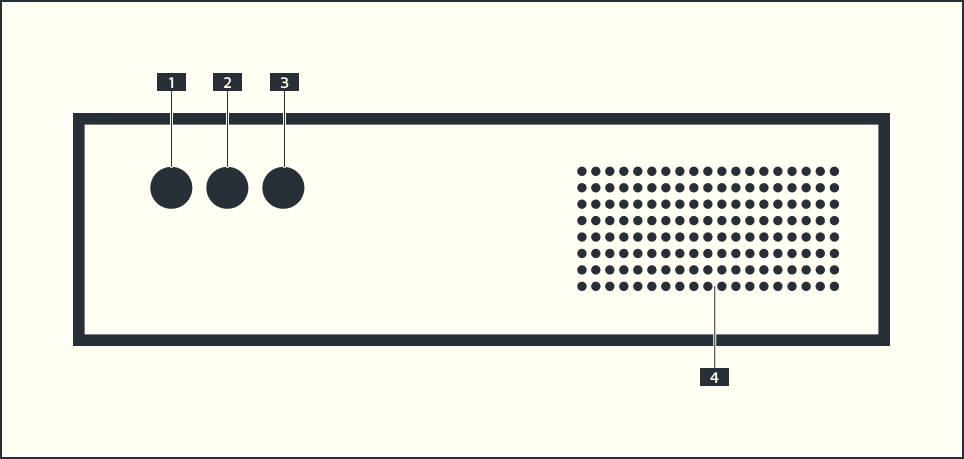
The front panel
Nothing here controls audio:
№ |
Element |
What it does |
|---|---|---|
1 |
POWER |
switches the device on |
2 |
RESET |
reboots the server, just in case |
3 |
POWER LED |
says whether it is on |
4 |
Fan and filter |
clean it regularly |
Audio in and out
All of it: Patchbay.
Clock sources
The tempo comes from A³ Motion (INT), from the music (EXT) or from a Pro DJ Link tempo master (PIO), chosen on A³ Motion’s clock key. What each mode needs: Beat Analyzer › Clock modes.
The screen and its workspaces
The portrait touch screen (768 × 1024) shows one workspace at a time:
Workspace |
What is on it |
|---|---|
MOTION (1) |
A³ Motion’s touch screen |
STEMDECK (2) |
StemDeck, always running |
REAPER (3) |
the audio engine |
QJACKCTL (4) |
the JACK patching |
SCARLETT (5) |
the Scarlett interface’s mixer, when it is open |
Between the touch apps: the key at the far right of the top bar (STEMDECK in A³ Motion, MOTION in StemDeck), in the same spot in both. ▾ lists workspaces that have a window.
On REAPER, QJACKCTL, SCARLETT: tap MOTION or STEMDECK in the bar at the top (hidden on the touch apps, which fill the screen).
The window
http://<core>:9080 from anywhere on the network shows what the devices
actually say to each other — the answer to “cable, setting, or me?”, since
over UDP a control nobody hears looks like one that works.
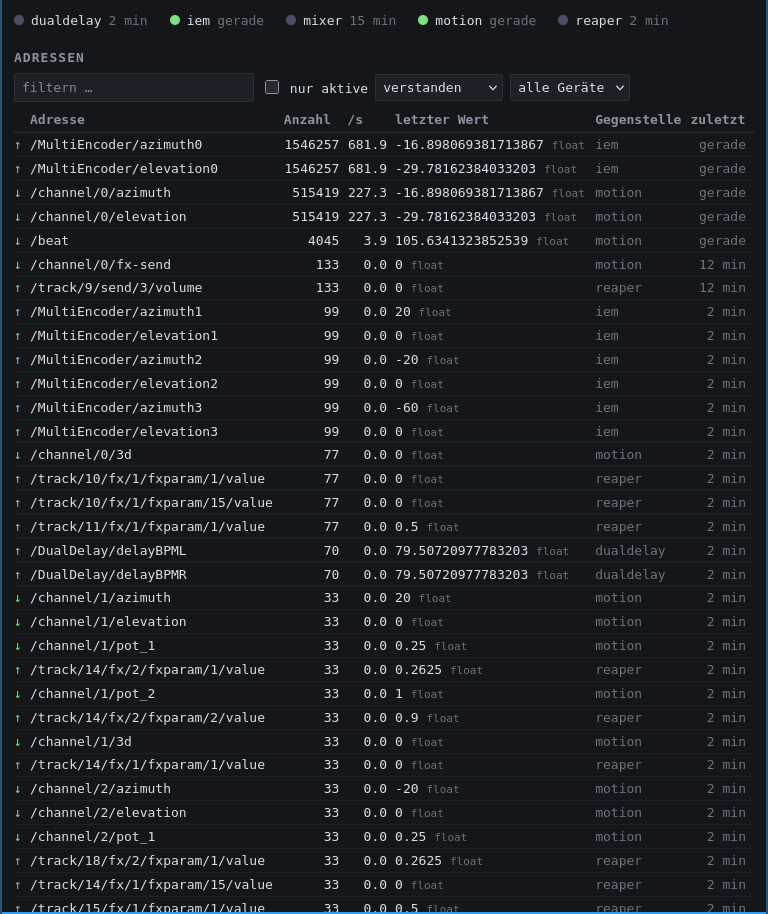
Top: the peers, each with a last-heard dot; per device, a3-osc.json is Core’s or, red, DIFFERS from Core’s (an older truth; what to do — desk, StemDeck and Motion fix themselves within seconds).
Rows: one per address — count, rate, last value, device.
Verkehr / Register: what went past, or every address that can exist; nur tote Drähte shows those that never arrived.
The address list survives a Core restart; values and history don’t. It only looks, it never controls.