Welcome
The A³ System
Tip
New here? Start with A³ Motion’s first ten minutes, and keep On stage open before your first gig.
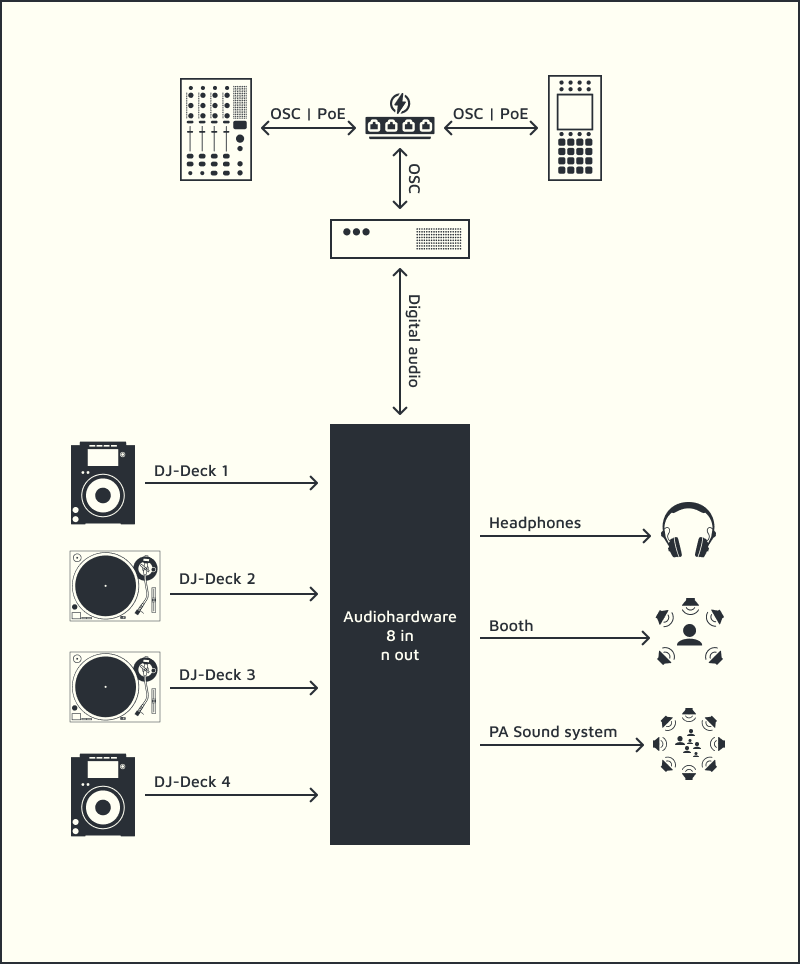
Three devices on one network, talking only OSC (ports):
Device |
What it is |
What it does |
|---|---|---|
the sound server |
takes the audio in, computes the 3D field, sends it out; remote controlled |
|
a 4-channel DJ mixer |
gain, EQ, filter, faders, cue, all as OSC |
|
the motion sampler |
a loopstation for where a sound is |
All audio — decks, phones, booth, main — connects to A³ Core. Two programs belong too:
Program |
What it is |
What it does |
|---|---|---|
the beat clock |
on the Core: the beat and the level meters for every device |
|
a stem player |
two decks of four stems, each on its own output, so one part can move alone; tempo master without CDJs |
Tip
StemDeck × A³ Motion. Put StemDeck’s four stems on A³ Motion’s four channels and let the drums, the bass, the synths and the vocal each travel the room on their own path — in time with the track, because StemDeck is the clock. See StemDeck × A³ Motion.
One state, told to everyone
Because the devices talk over OSC rather than through each other, there is only ever one state, and every device is told all of it.
What you do |
What follows |
|---|---|
turn a knob on the A³ Mixer |
A³ Motion’s screen follows |
move a fader in Core’s own mixer |
both devices follow |
switch a device on mid-evening |
it asks what is already sounding before it says anything, so nothing jumps |
The same feed can be given to anything else — a light or video desk, say — by naming it when the Core starts. See Adding a department.
The beat
The Beat Analyzer on A³ Core sends the tempo every device follows, and the meters they show. Its clock comes from A³ Motion’s own tempo, from the music, or from a Pro DJ Link tempo master — a CDJ, or StemDeck. Everything that moves on its own counts in bars, so a four-bar figure stays four bars when the tempo changes.
Where to go next
Section |
What is in it |
|---|---|
User |
the three devices, control by control — start here — and the beat analyzer and StemDeck |
the umbrella repository that carries all the others |
|
Assembly |
prototype pictures and how the boxes go together |
Configuration |
installing the system, each device’s hardware, and the files each device reads at startup |
Development |
building and hacking on the software |
project impressions |
|
every address the system speaks |