A³ Mixer
A four-channel DJ mixer that makes no sound: every control sends OSC to A³ Core, which does the audio. A³ Motion’s MIX pages show the same values. Source: a3-mixer.
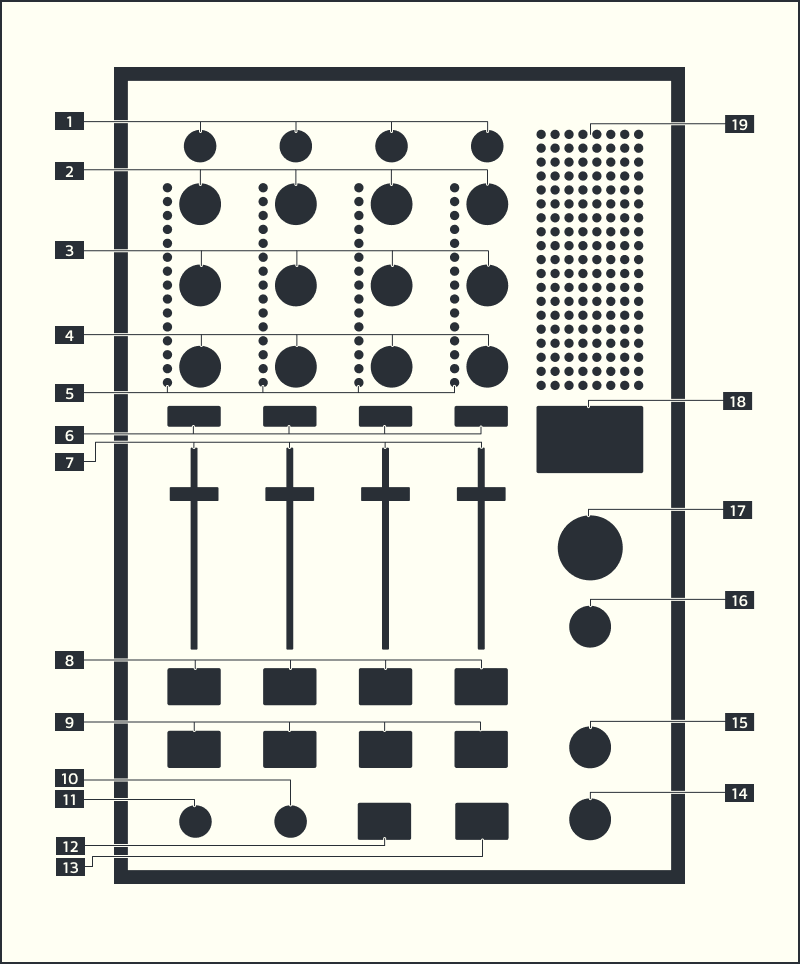
The drawing predates the V02 panel: AUX SEND and AUX RETURN exist but have no number.
The channel strip
Four strips, in signal order:
№ |
Control |
What it does |
Range |
|---|---|---|---|
– |
AUX SEND |
to the beat-synced tape delay on the FX bus |
−inf … 0 dB |
1 |
TRIM |
input level |
−inf … 0 dB |
2–4 |
EQ HIGH / MID / LOW |
24 kHz / 1 kHz / 20 Hz |
−inf … 0 dB |
5 |
INPUT VU |
pre-fader peak, 8 LEDs at −36, −24, −18, −12, −9, −6, −3, 0 dBFS (4 green, 2 yellow, 2 red); red is −3 dBFS and clipping. Louder side of |
|
6 |
TAP |
taps the tempo on the press; all four do the same and flash red on the beat. Goes straight to the beat-analyzer, not via Core |
|
7 |
FADER |
output level |
−inf … 0 dB |
8 |
FX |
channel through the shared filter; green while on |
|
9 |
CUE |
pre-fader cue to the phones; blue while on. See The cue |
3D is A³ Motion’s pot, not the desk’s.
The filter section
One filter for all channels; a strip’s FX key sends it through.
№ |
Control |
What it does |
|---|---|---|
10 |
FREQUENCY |
cutoff |
11 |
RESONANCE |
Q at the cutoff |
12 / 13 |
HPF / LPF |
high-pass / low-pass; lamp blue / green |
Monitoring and outputs
№ |
Control |
What it does |
Range |
|---|---|---|---|
14 |
HEADPHONE LEVEL |
phones level |
|
15 |
CUE/MIX |
cue (left) to mix (right), constant power |
|
16 |
BOOTH |
monitor outputs |
−inf … 0 dB |
17 |
MASTER |
PA outputs |
−inf … 0 dB |
– |
AUX RETURN |
the fifth stereo input: analog 11/12 or StemDeck’s AUX, as its display selects (REAPER’s Return gain) |
0 dB at full travel |
18 |
DISPLAY |
BPM, work in progress |
|
19 |
OUTPUT VU |
|
The cue
Each channel bus sends to enc_phones twice in REAPER: send 3 pre-fader
(cue, open only while CUE is on) and send 4 post-fader (mix). CUE/MIX
crossfades them.
A channel’s cue is its CUE key (desk or A³ Motion), nothing else.
It is always the channel’s own cue, analog or stem, with its filter and EQ: push another stem on and the cue follows.
The return has its own cue (CUE field on its display); on the mix side it is always heard.
Analog phones (REAPER in 9–10) always reach the phones via
dec_phones.StemDeck has no cue: cue the channel a stem is on, or the return for a stem on AUX.
The virtual desk
The A³ Desk is the A³ Mixer on a screen. It looks like the panel and sends the same OSC to Core. Use it as a second operator beside the hardware, or as a stand-in when the hardware is not there.
Install and open
Install it with the installer’s role desk (on any Debian machine with a
screen). Then start a3-desk from a terminal, or A3 Desk from the
launcher.
What it shows
All pots, keys, the channel LEDs, the five displays and the meters, as on the panel. The values come from Core, so the desk shows what the room is doing, not what it last sent.
The ring
A value you set on the desk carries a small ring. It means: this value was set here; the hardware knob probably stands elsewhere. The ring goes away when Core reports a different value for that control.
The mixer has no motor faders. When someone touches the hardware knob next, it sends its own position and the value jumps to it. Watch the ring before you hand a control back to the hardware.
LOCK
LOCK holds MASTER, BOOTH and PHONES level. While it is lit, the desk ignores these three pots, and the status bar says master locked. Press LOCK again to release them.
Keyboard
Key |
Does |
|---|---|
1 – 4 |
CUE of channel 1 – 4 (phones only) |
Space |
TAP |
Nothing on the keyboard changes the PA. Ctrl, Alt and Cmd combinations are left alone.
Limits
Core follows four desks. A fifth is refused.
One desk per machine. A second one says another desk runs on this machine.
The desk is dim until Core answers. It stays dim and ignores input while it says waiting for Core’s answer.
Core silent: no sign of life from Core for 5 seconds. The desk dims again and takes no input until Core is back.
Core serves another truth: Core’s OSC table differs from the one the desk was built with. Install the desk from the same version as Core. The desk does not say hello to a stale Core.
Core drops a desk that has been silent for a minute, which frees its place.
The input selectors
The desk switches StemDeck’s stems through Core. Each of the 8 stems (2 decks × 4) can play on its own channel (stem N on channel N) or on AUX (the return). StemDeck owns the switches; Core relays requests and reports. Five OLED displays with encoders: channels 1–4 and the return.
The rule: a channel plays one input: deck 1’s stem N, deck 2’s stem N, or its analog input. A stem plays on its own channel only; nothing moves between channels. A stem on a channel shuts its analog input.
A channel
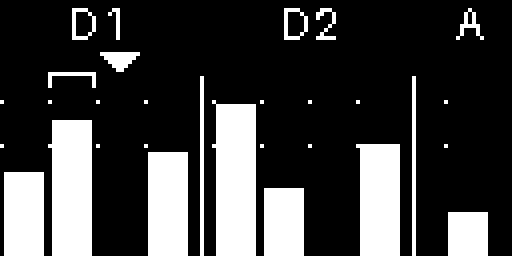
Bracket: the stem that plays. Arrow: the cursor, on the other deck’s stem (silent). A: a little analog level. Ticks: −9 and −3 dBFS, the LED scale. The picture still shows the older nine-meter selector.
Three meters under D1 | D2 | A: deck 1’s stem N, deck 2’s stem N, and
A, the channel’s analog input (always metered, louder side of
analog<N>_L/R, /vu/1–/vu/8). Not StemDeck’s A switch. The bracket
marks what plays; the arrow is the cursor. On the virtual desk, tapping a
meter turns the cursor there.
Action |
Result |
|---|---|
turn |
moves the cursor round the ring of three; switches nothing |
push a stem |
it becomes the only input; the other deck’s stem N goes to the return (AUX) |
push the stem that plays |
off; the channel plays analog (STEM mode: the stem goes to the return) |
push A while a stem plays |
same as above |
push A while analog plays |
nothing |
Core remembers no last stem; the cursor stays after a push. A stored cursor that is not on the ring comes back on A. Several stems on one channel, or a stem on another channel (older StemDecks): Core keeps the lowest and puts a foreign stem on AUX, about 0.3 s after StemDeck’s reports settle.
The aux return
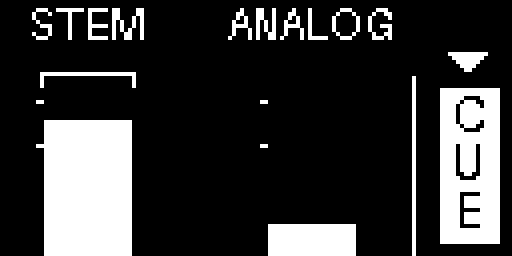
Bracket: STEM plays. ANALOG quiet. CUE filled: the return is cued.
The return plays STEM (StemDeck’s AUX bus) or ANALOG (analog 11/12),
never both; Core opens one in REAPER and shuts the other. Meters: STEM
(louder side of the AUX bus; older StemDecks: the loudest stem on the return),
ANALOG (aux_L/R), and the CUE field (filled while cued). Turn:
STEM → ANALOG → CUE. Push:
CUE: return cue on/off, on the cue side of CUE/MIX.
STEM, stem mode: the return plays StemDeck’s AUX bus; analog 11/12 is shut. Every stem that no channel plays goes to the return (StemDeck’s A on that stem). A stem a channel takes leaves the return, a stem a channel lets go returns to it. If you switch a free stem’s A off in StemDeck, Core undoes it after about 0.3 s.
ANALOG, analog mode: the return plays the analog inputs 11/12; StemDeck’s AUX is shut. The free stems stay on AUX, unheard, so switching back to STEM brings them back at once; the STEM meter keeps showing them.
How the meters move
10 updates a second; instant rise, 20 dB/s fall, no peak marks. Over 0 dBFS the bar is hatched for a second; a clean full bar stays solid.
Without StemDeck
Core keeps each cursor and the return’s mode and cue across restarts; a cursor starts on A.
Without StemDeck, turning works, pushing switches nothing, all channels play analog. A fresh StemDeck takes no channel (stems start on AUX).
A click on StemDeck’s own bus switch moves the bracket too.
StemDeck says hello every 30 s. Silent for a minute: Core takes all stems off the channels (noticed at the next hello of any device, so up to ~90 s).
Connectors
Where |
Socket |
For |
|---|---|---|
Front |
PHONES OUT |
6.3 mm stereo jack |
Back |
PHONES IN |
cue outputs back, 2× female XLR |
Back |
ETHERNET |
PoE: power and all messages |