How A³ sounds
You play a set as usual: tracks, EQ, faders, a filter, an echo. The difference is the room. The hi-hats of the break circle the crowd. The vocal lifts over the floor and drops back on the one. The kick and the bass stay put, so the floor never loses its ground. This page shows what happens to your sound on the way from the deck to the speakers, and what you touch to make it move.
A³ in three sentences
A³ is a DJ setup for a room with speakers all around the crowd, not just in front of it. You mix on a four-channel desk as on any club mixer, and A³ Motion or StemDeck decides where each part of the music is in the room, in time with the beat. A computer, A³ Core, runs a3-core: it takes everything you play, places it in the room, and feeds every speaker exactly its share.
Two ways to play: stereo and stems
Each of the four desk channels plays one of two kinds of source. You choose it with the channel’s INPUT knob on the desk: ST is the stereo input, A to D are the StemDecks. You can mix both on one evening, for example a turntable on channel 1 and a StemDeck on channel 2.
Stereo mode (ST) |
Stem mode (deck A to D) |
|
|---|---|---|
You plug in |
a CDJ, turntable or laptop |
nothing: StemDeck is software |
A track is |
one stereo signal |
four stems: drums, bass, other, vocals |
What moves |
one band you pick (FREQ, Q) |
one stem, while its action runs |
What stays |
the rest of the track |
the other stems |
Who steers |
A³ Motion: its clip and 3d |
StemDeck: ORBIT, PING, RISE, SCAT |
You touch |
the desk, and 3d, FREQ, Q |
the desk, the pads, GAIN, WIDTH, AUX-Send |
Stereo mode: one band moves, the rest stays
A whole track that flies around the room smears: the kick wanders off the floor and the crowd loses the beat. So A³ never moves the whole channel. It cuts one band out of it and moves only that band.
FREQ picks where the band sits, from the bass up to the hi-hats.
Q sets how wide the band is: narrow takes a single sound, wide takes a lot of the track.
3d sets how much of that band leaves the rest. At 0 nothing moves: the channel is plain stereo, spread around the room. Turn it up and the band comes loose and follows A³ Motion’s path.
Everything outside the band stays where it is, so the kick holds the floor.
Try it: play a track with a clear hi-hat. On A³ Motion, start a clip on its channel, turn FREQ high and Q narrow, then turn 3d up. The hats start to circle; the kick does not.
See A³ Motion for clips, paths and actions.
Stem mode: every stem has its own path
StemDeck plays a track that is split into four stems. Each stem is placed in the room by StemDeck itself, before the sound reaches the desk.
At rest every stem sits all around the room, like the steady part of a stereo channel. You hear the track as one piece.
An action lifts one stem out and moves it: ORBIT circles, PING jumps from side to side, RISE goes up, SCAT scatters. It starts on the next bar and lasts ½ to 8 bars (the length keys under the pads). Then the stem goes back to its place and sinks into the rest again.
WIDTH sets how wide a moving stem is: a narrow point or a broad wall.
GAIN is the stem’s level; a push on its knob mutes it.
AUX is the stem’s AUX-Send to the beat delay (see The extras).
On the A³ Motion panel, the four pots are the AUX of the four stems, the upper encoders GAIN, the lower ones WIDTH.
Try it: load a track on deck A and press PLAY. On the desk, turn channel 1’s INPUT knob to A, push it, and bring the fader up. Tap RISE on the vocal stem: on the next bar the vocal lifts over the crowd and comes back down after the bars you chose.
There are up to four decks, A to D. Deck A runs on A³ Core itself. Decks B to D can run on other computers next to the desk and send their sound to the Core over the network (AES67, see the glossary). A deck sounds the same either way. See StemDeck.
A³ Motion does not move a deck: on a deck channel its screen says DECK A (or B, C, D), and the stems follow StemDeck’s actions.
From the deck to the speakers
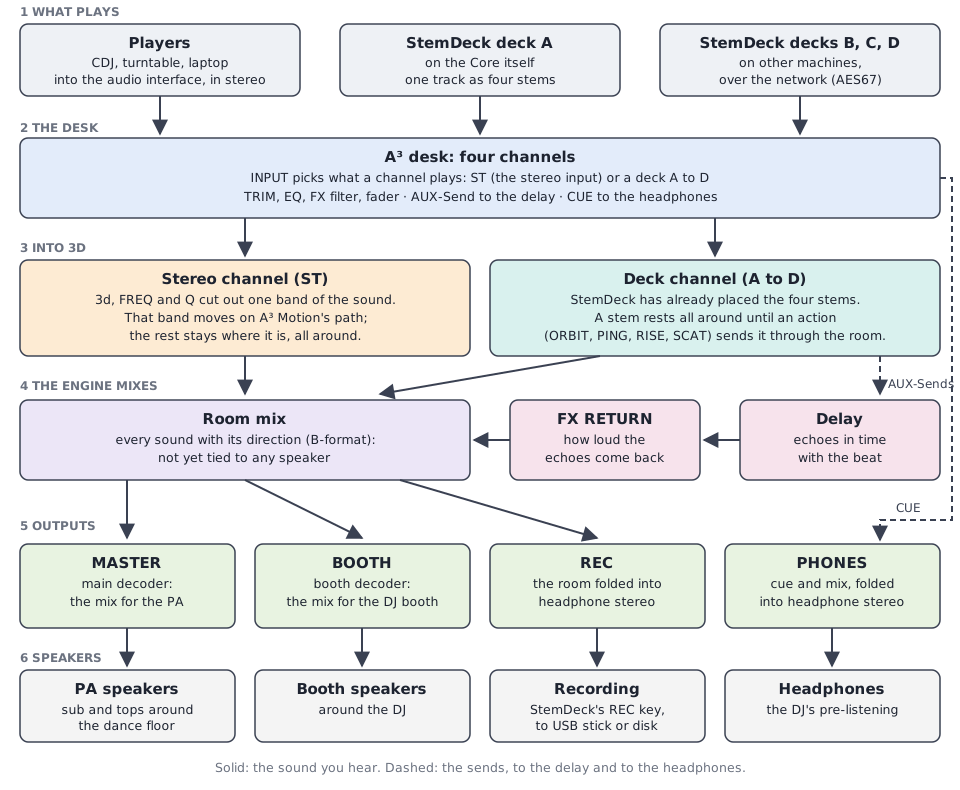
The way of the sound, top to bottom.
What plays. Players go into the audio interface of A³ Core, in stereo. StemDecks are already on the computer, or reach it over the network.
The desk. Each channel picks its source with INPUT, then works like any DJ mixer: TRIM, EQ, the FX filter, the fader. The desk makes no sound itself; it tells A³ Core what to do.
Into 3D. Each sound gets its direction: the moving band of a stereo channel from A³ Motion, the stems from StemDeck. Everything else stays spread around.
The room mix. The engine adds all channels into one mix that knows where every sound is, but not yet which speaker plays it (that is B-format, see the glossary). The echoes of the delay join this mix through FX RETURN.
Four ways out. The same room mix leaves four times:
MASTER for the PA. A decoder works out what each PA speaker plays.
BOOTH for the speakers around the DJ, with its own decoder.
REC for the recording: the whole room folded into headphone stereo. It does not follow MASTER, so a set is recorded even with the PA down.
PHONES for your headphones: what you cue, and the mix.
The speakers. The PA plays the room; the booth plays the same around you; StemDeck’s REC key records the REC mix to a USB stick or the disk.
When A³ Core starts, its outputs stay silent until every device has told the engine its settings. Then they fade in over one second. A restart never blasts the room with a wrong level.
The extras: cue, delay, recording
Cue (pre-listening). Press CUE on a channel to hear it in your headphones before the crowd does, even with its fader down. CUE/MIX blends between what you cue and what the room hears; PHONES is the level. A StemDeck stem has its own CUE key, so you can check the vocal of the next track alone. The headphones get the same 3D sound, folded to two ears.
Delay (echo). A³ has one beat-synced delay, a tape-style echo whose time follows the tempo.
A channel’s AUX-Send on the desk sends that channel into it, from where the channel sits in the room, so the echo comes from the same side.
A stem’s AUX-Send (its AUX knob in StemDeck) sends just that stem, for example only the vocal.
FX RETURN on the desk sets how loud the echoes are in the room. At zero the delay is silent on the PA.
A pulled fader sends nothing: an echo only starts from a channel that plays.
Recording. StemDeck’s REC key records the REC mix: everything that the room hears, echoes included, folded to stereo. On a USB stick if one is in, otherwise on the disk.
Words used here
One name per thing: every page uses these.
Word |
In plain words |
|---|---|
3d |
how much of a channel’s sound moves through the room. 0: none, it stays spread around. Printed 3D on A³ Motion’s screen |
AES67 |
a standard way to send many audio channels over an ordinary network cable. A StemDeck on another computer reaches A³ Core this way |
A³ Core |
the hardware: the computer with its audio interface that everything plugs into |
AUX-Send |
a second way out of a channel or a stem, into the delay. The normal way out (the fader) stays as it is. Printed AUX SEND on the A³ Mixer, SEND on the virtual desk and A³ Motion, AUX on a StemDeck stem |
B-format |
sound stored as “what comes from which direction”, not as “what plays on which speaker”. It fits any speaker setup; a decoder turns it into speaker signals |
bus |
a mix that several sources go into, like the room mix or the headphone mix |
cue |
pre-listening in the headphones, before the crowd hears it |
decoder |
the step that turns B-format into one signal for each speaker of a room. The PA and the booth each have their own |
desk |
the four-channel mixer you play on: the A³ Mixer is the hardware panel, the virtual desk the same mixer in software, on a screen |
ST |
a desk channel’s stereo input, for a CDJ, a turntable or a laptop. (A to D are the StemDeck decks) |
stem |
one part of a track: drums, bass, other or vocals. StemDeck plays four of them together |
a3-core |
the program on A³ Core, audio backend included, that places every sound in the room and feeds the speakers. Its settings are in the a3-core window |
zone |
one set of speakers with its own decoder: MAIN (the PA) and BOOTH |
Where to go next
A³ Motion, to make stereo channels move: first ten minutes.
StemDeck, to play stems: StemDeck.
The desk: A³ Mixer.
What you need, speakers or headphones: What you need.
Setting up the room, speakers and levels: Setting up a room.
Your first set: First set.