What you need
The short answer: one computer with a multichannel audio interface, and at least four speakers around the crowd, or just headphones. Everything else either has a software stand-in or is optional.
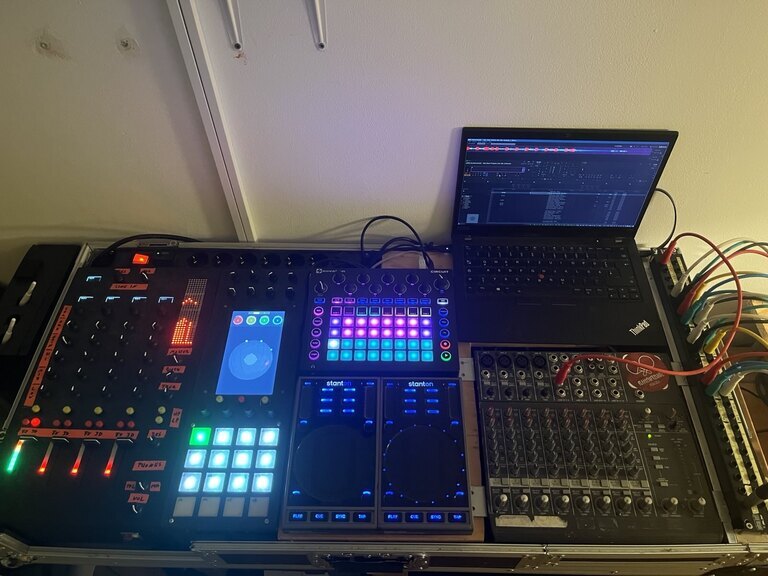
Part |
What it is |
Do you need it? |
|---|---|---|
A³ Core |
the computer everything plugs into; it runs a3-core, the 3D audio |
yes |
Audio interface |
on the Core: the stereo inputs (ST) and one output per speaker |
yes |
Speakers |
around the crowd, a sub if you have one |
at least 4, or headphones only |
Headphones |
on the PHONES output: cue, and the whole room folded to two ears |
yes |
the stem player, software |
for stems; deck A runs on the Core |
|
the four-channel desk, hardware |
no: the virtual desk does the same on a screen |
|
the motion sampler, hardware panel with a touch screen |
no: its screen alone, by touch or mouse |
|
Network switch |
one cable per device; PoE powers the hardware panels |
with the hardware panels |
Players |
CDJs, turntables, a laptop, into ST |
optional; StemDeck plays without them |
Deck hosts |
a computer of its own for a further StemDeck deck |
optional; further decks can also run on the Core |
Note
Cost. A³ is not for sale yet. What the parts and kits cost will be published with the Kickstarter campaign.
A³ Core and the audio interface
A³ Core is the hardware: the box everything plugs into. a3-core is the program running on it, audio backend included, which places every sound in the room and feeds each speaker (Setting up a room).
The computer: a PC on Debian testing with a realtime kernel. The rig runs on an Intel NUC (NUC8i7HNK) with a portrait touch screen, which shows the a3-core window and StemDeck deck A. Earlier Cores ran on a tower and a Mac (assembly).
The interface: the rig uses a Focusrite Scarlett 18i20. The shipped I/O map uses:
Use
Interface channels
ST inputs of channels 1–4
inputs 1–8 (a stereo pair each)
MAIN: sub and four tops
outputs 1–5
PHONES
outputs 9–10
BOOTH: sub and four tops
outputs 11–15
So the shipped map needs an interface with 15 outputs. A smaller one works too: assign the outputs you have on the a3-core window’s I/O page (four tops and the phones are 6 outputs; the booth is optional).
Inputs: one stereo pair per ST channel you want to use. With StemDeck only, you need none.
Speakers, or headphones
At least four speakers around the crowd. The shipped layout is a square of four tops with one sub (4.1). Another layout, more speakers or different angles, is set on the a3-core window’s SPEAKERS page (ZONES and SPEAKERS).
Or just headphones. The PHONES output carries the whole room in binaural stereo: turn CUE/MIX to MIX and every movement is in your ears. The REC output is the same binaural mix, for the recording. This is the way to try A³ before you have a speaker ring.
A booth of its own (BOOTH, a second set of speakers around the DJ) is optional.
The panels and their stand-ins
|
|
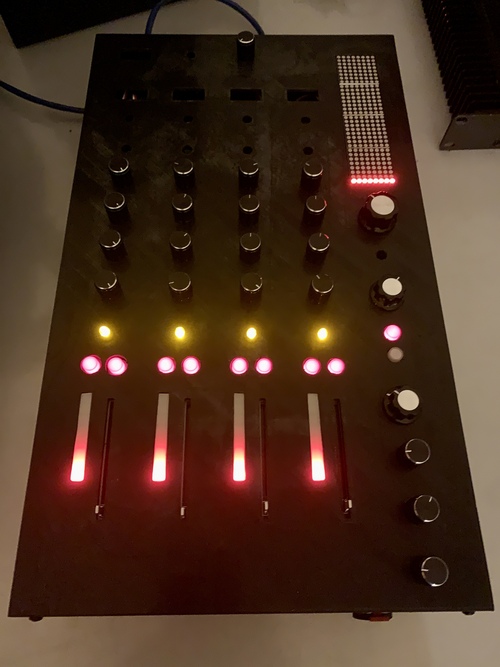
The A³ Mixer (V02) |
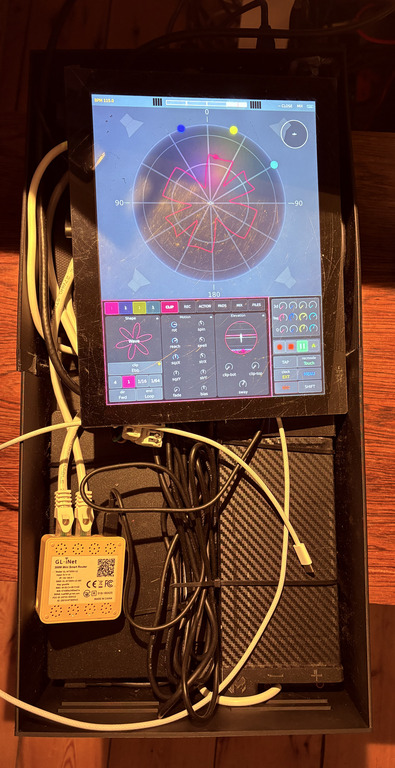
A³ Motion (v03), open |
Hardware |
Software stand-in |
What you lose without the hardware |
|---|---|---|
A³ Mixer: the desk, four channels, OSC and power over one PoE cable |
the virtual desk ( |
knobs and faders under your fingers; the delay rows of the FX Return display |
A³ Motion: pads, encoders and pots beside a touch screen, a computer of its own inside |
the Motion UI alone, by touch or mouse; 3d, FREQ and Q are in its channel row |
the pads and the pots, two hands at once |
In the dark of a booth the hardware is what you want; the stand-ins are for trying, for a second operator, and for the day a panel is not there. The hardware is a prototype you build yourself: boards are KiCad files and the housings print on a 3D printer (Assembly).
The network
The A³ switch: Core, the Mixer, Motion and any deck host on one Ethernet switch. All control goes over OSC on it (ports). A PoE switch powers the Mixer and Motion over the same cable.
The audio network, only for deck hosts: a second socket on the Core and on each deck host, joined by a cable or a switch. A deck host sends its deck as one AES67 stream (StemDeck on another machine).
The audio network
Decks on other machines only sound clean if every packet arrives. Two decks send about 100 Mbit/s to the Core, without a pause, for the whole set.
Its own gigabit switch. Put the Core’s audio socket and every deck host’s audio socket on a gigabit switch of their own, not on the house router. On a router’s built-in switch, two decks lost about one packet in thirteen: a constant crackle on both decks. A small dedicated gigabit switch fixed it.
Energy Efficient Ethernet off. Many small switches save power by putting the line to sleep between packets (EEE, “Green Ethernet”). For audio that is fatal: the clock sync (PTP) times out, a deck goes silent or crackles, links drop. A³’s packages switch EEE off on the Core and on every deck host, so you do nothing — the check is in The audio network: EEE.
IGMP snooping helps on a managed switch shared with other devices. With only the A³ machines on the audio switch it is not needed.
Effort
Installing: one installer run per machine (A³ Installation). Packages by default, nothing to compile.
Setting up a room: cables, speakers, level, once per room (Setting up a room). After that a3-core starts with your settings.
Making stems: StemDeck splits a stereo track into four stems (Making stems). Do it before the gig, best on your own computer: it takes a while, and the Core’s processor is for playing.
Warning
Today the installer has a limit. The rig’s roles (Core, StemDeck,
Motion, deck host, desk) install only for the user aaa, with the
checkout in /home/aaa/a3-system: their services name that path.
Anywhere else the installer only shows what it would do (--dry-run). The
new laptop role, the whole rig on one machine, runs as any user; it is
still being tested (A³ Installation).
Next
First set: your first twenty minutes, with or without speakers.