FPV: play the floor
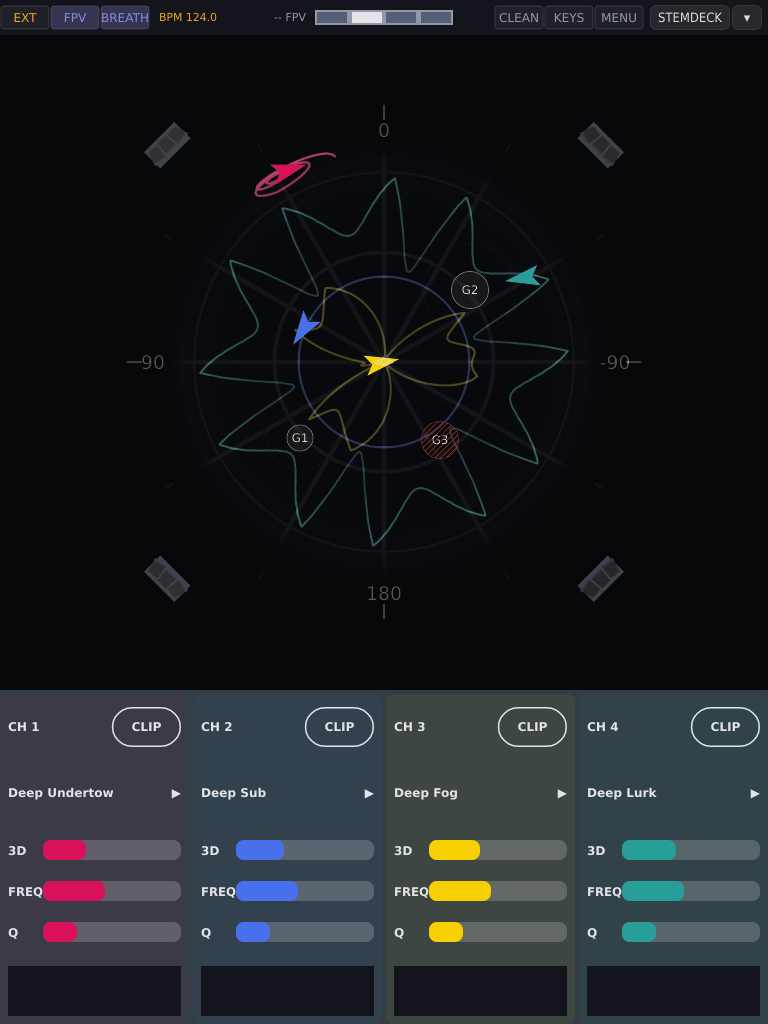
FPV is A³ Motion’s second view, for watching and playing a set: the room and four ships, no editor. FULL is everything else on these pages. The key between them is in the status bar, right of the clock key; it lights while FPV is up. Switching only changes what you see: the sound does not move, and the device wakes up in the view it was left in.
Part |
What it shows |
|---|---|
status bar |
as in FULL, plus FULL/FPV, BREATH and PILOTS |
sphere (top two thirds) |
the room; each playing clip is a ship, a small craft pointing where it is going. The guest groups are marked on its dance floor |
strips (bottom third) |
one per channel: |
The strip’s meter is the same LED meter StemDeck shows: green up to about −12 dB, yellow above it, red near full scale, and a short line that holds the last peak for a moment. The two screens read alike side by side.
The floor and the four kinds of people
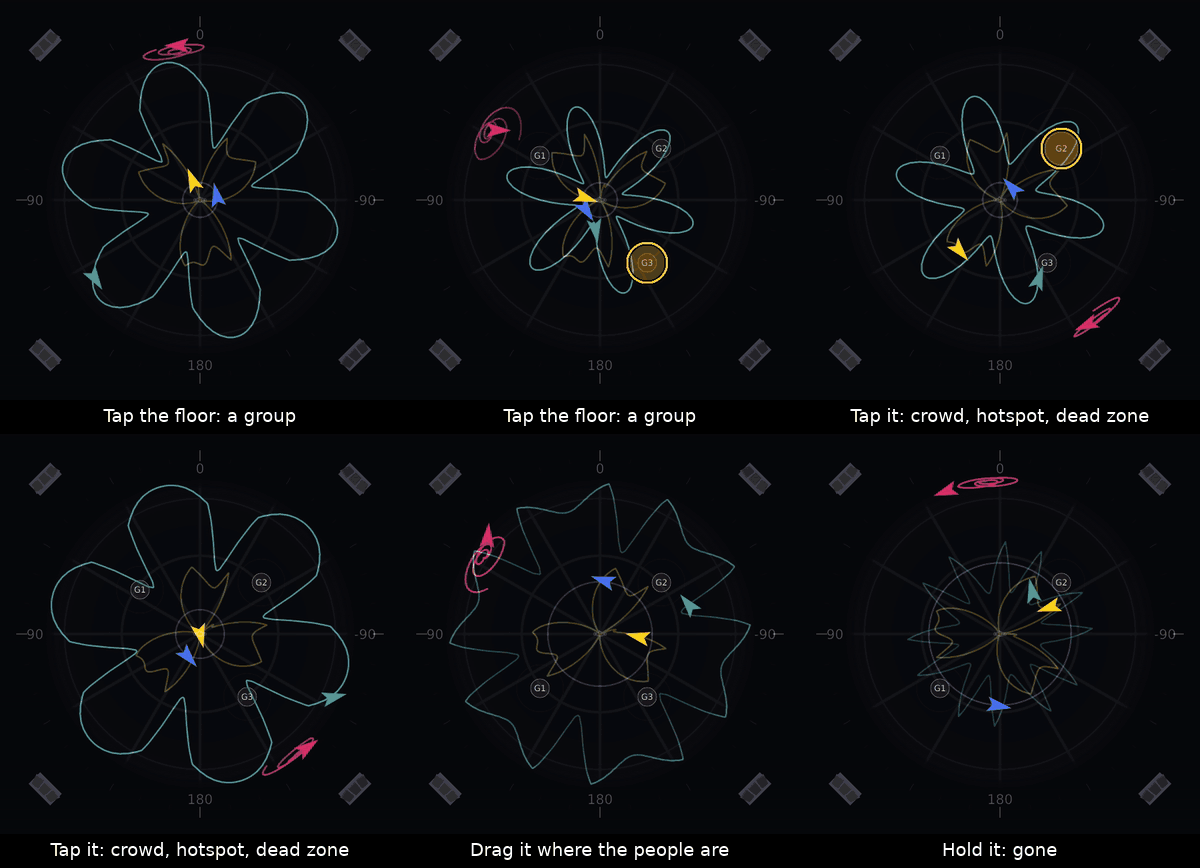
You tell A³ Motion where people are by tapping the floor. Each tap puts a group there: a mark painted on the dance floor, labelled G1 to G8 (a number, not a kind). Tap the group to say what it is; each tap steps to the next kind:
Kind |
On a real floor |
Pull |
What an ORBIT ship does |
Looks like |
|---|---|---|---|---|
G group |
a few people |
light (0.5) |
leans towards them on the one |
a small disc on the floor |
C crowd |
a dancing crowd |
1 |
leans a little more |
a bigger disc |
H hotspot |
“more of this here” |
1.5, the strongest |
leans most |
the biggest disc |
X dead zone |
“not here”: the bar, the booth, a dead corner |
pushes away (−2) |
keeps out of it, always |
red and hatched: the only red thing on the floor |
Tap order: G → C → H → X → G. The discs swell on the one and rest on the other beats.
Groups pull only on the one (beat 1 of each bar), so every lean lands on the downbeat. A dead zone’s wall works on every beat.
The pull is light on purpose. A group says where the sound goes; it does not make the movement on its own (see What to expect).
Groups last for the session. A restart of the device clears the floor.
Up to eight. A ninth tap says
-- 8 GROUPS.Out to the speakers. A group can stand anywhere on the floor, out to the four speaker towers, not only inside the ball. The ships themselves stay inside the ball’s outline: a ship that circles a group at the edge slides back and forth along the rim in front of it.
Rings. A faint ring round a group shows how far it reaches; round a dead zone it shows the space the ships keep clear. Seen from the side, discs and rings lie flat on the floor like paint. Hold a group and a red ring fills clockwise from the top; when it closes, the group is gone.
The ships
Each playing clip is a ship: a small craft in the channel’s colour with a glowing engine at the tail. It points the way it is flying, and it turns with the view like everything else in the room.
Hidden behind something. When the ball, a speaker tower or another ship is between you and a ship, you see only a thin dim outline of it, so you never lose where it is. Inside the glass ball nothing hides a ship.
The far side. A ship on the back half of the ball is drawn smaller and darker than one on the front, so you can tell near from far.
Its line. What the ship draws on the ball depends on its mode:
The ship is … |
The line on the ball |
|---|---|
in CLIP |
the clip’s trajectory, as in FULL |
in ORBIT, patrolling |
its orbit, the big path it is really flying, in the channel’s colour, a little quieter than a trajectory |
in ORBIT, escorting |
the escort circle round the group |
in a game |
no line: the game’s dashed line and its name mark it |
The clip’s own trajectory is not drawn under an ORBIT ship, because the ship has left it. When the ship goes back to CLIP the trajectory comes back at the start of its one-beat glide. Two ships on the same orbit draw it twice, and it shows brighter.
CLIP or ORBIT
In FPV every channel is in one of two modes, shown on its strip:
Mode |
The ship … |
|---|---|
CLIP |
flies the clip, exactly as in FULL. Groups do nothing to it |
ORBIT |
leaves the clip and flies one big ellipse round the room, one lap per four bars. The groups bend it |
PAGE (short press) switches a channel between them. Nothing jumps: into ORBIT the ship glides off its line from where it is; back to CLIP it glides onto the clip over one beat, in phase, because the clip kept running underneath.
The ellipse turns slowly, once every 32 bars, so even an empty floor is not the same circle again and again.
It is locked to the bar: however far a group pulls the ship, it stays in time. At any tempo a lap is four bars.
The ship stays in its clip’s height band. A clip that sits low flies a low orbit.
ORBIT flies only while the clip plays. With no clip, or a stopped one, the readout says
CH1 ORBIT · no cliporCH1 ORBIT · stopped. Play|Pause stops and starts an ORBIT ship as it does a clip.ORBIT is the channel’s, not the view’s: switch to FULL and the ship keeps flying its orbit; its blob follows it, and Play|Pause or PAGE reads
CH1 ORBIT.
Patrol and escort
An ORBIT ship patrols by default: it flies the big path and leans towards groups on the way. You can also send it to escort one group: it leaves the path and circles that group, one turn every two bars. The heavier the group, the wider the circle (the ring drawn round the group is the circle it flies). A thin line in the ship’s colour joins it to its group.
To |
Do |
Strip and readout |
|---|---|---|
escort a group |
hold the channel’s PAGE, tap the group |
|
back to the path |
hold PAGE, tap empty floor |
|
Escort switches the channel to ORBIT if it was in CLIP.
A dead zone cannot be escorted: the ship patrols.
Removing the group, or making it a dead zone, sends its ship back to PATROL, and it stays there.
While PAGE is held, a tap never removes a group, however long the finger stays.
The breath
With BREATH on, every ORBIT ship stands still on beat 4 of every bar and sets off again on the one. The stop on the grid is what keeps the movement alive: the restart on the one is an event the whole floor hears. Without it, an orbit soon sounds like it only goes round.
On at every start. BREATH in the status bar switches it off or on for the session; the readout says
-- BREATH ONor-- BREATH OFF. The next start has it on again.It works in both views, so the key is in both.
A stop is never cut short and never starts late: switched during beat 4, the change shows from the next bar.
Escorting ships breathe too and keep their circle. Ships in CLIP don’t breathe: they fly their clip. A ship in a game flies through the stop and does not breathe.
In a bar of fewer than three beats there is no breath.
Pilots and games
A game is a short figure that ships fly against the guests on the floor, timed to the music. It is a gesture for the room: something builds, something feints, something lands on the one. A game starts at once and lands on the next fitting change in the music (a drop, the end of a breakdown), or else on the next four-bar line. A ship in a game ignores its target group’s pull and flies through the breath’s stop. A ship is never in two games at once.
Game |
What the room hears |
Fits |
How long |
|---|---|---|---|
Fake-out |
The ship heads for the target group through the build, veers away a bar before the drop, then dives at it on the one. A feint, then the hit |
a build with a drop up to eight bars away |
at least two bars, up to the drop |
Formation & scatter |
The ships line up across the room during the build, then burst outwards on the one. The whole room gathers and explodes |
a build |
at least one bar, up to the burst |
Hide & seek |
The ship slips quietly away to one side and reappears on the opposite side on the next one |
a breakdown |
a few bars: about two to slip away, then back on the one |
Call & response |
Two ships on opposite sides of the room answer each other, a bar each, two turns each |
a steady groove (it starts in the first four bars of every sixteen) |
about four bars |
The two ships of a call & response are always a pair. Fake-out and formation need a target: the nearest group, one you name, or the nearest crowd or hotspot. Without a group on the floor a game has nothing to play against, so put one down first.
Starting a game from a pad
A game is asked for by an action. Its script has a Pilot section with three lines; FULL ignores it, because the games are played on the floor FPV shows.
Line |
Says |
|---|---|
|
which game: |
|
whom it is played against: |
|
which ships fly it: |
Press the pad and the readout says, for example, CH1 A1 GAME FAKE-OUT. A
ship that is already in another game is not taken. Ships borrowed from CLIP
glide back onto their clip when the game ends. The newest request wins. The
FPV Games set has the four games on pads A1 to
A4; your own actions can carry the lines too.
The PILOTS key
The PILOTS key in the status bar (FPV only, left of CLEAN) says how much the pilots do on their own. Each tap steps OFF → HINT → FLY → OFF, and the choice is kept over a restart. Leaving FPV ends every game.
Level |
What happens |
|---|---|
OFF |
A game only when you press a pad that asks for one |
HINT |
When the music reaches a moment a game fits, the pad that would start it pulses in time with the beat. It is the lowest pad (A1 to A6) on a channel whose action asks for a fitting game, on a ship that is flying ORBIT and not in a game. Press it, or leave it |
FLY |
The pilots play. On a downbeat, when a fitting moment opens, one pilot starts one game on free ORBIT ships, then rests for four bars |
Your tap always wins. At FLY, if you press a pad that starts a game, or touch a ship that a pilot’s game is flying, the pilots’ games end and the key drops back to HINT. One tap on the key takes it to FLY again.
What you see
Under every ship in a game stands its name: FAKE-OUT, FORMATION,
HIDE or CALL. A game a pilot started itself carries a small, dimmer
AUTO beside the name; a game you started with a pad does not. When the game
ends the name stays one more bar and fades out, so a short game does not
vanish before you looked. Fake-out and formation also draw a dashed line
from the leading ship down to its target group.
Where the timing comes from
If StemDeck is running, its preview of the set says what is coming (build, drop, breakdown) and when the change lands, and the games follow it. Without StemDeck, A³ Motion listens to the room’s own levels: a drop is a jump to at least one and a half times the last bar’s loudness, a breakdown is a fall to half or less, a build is three rising bars. That guess expects the change on the next eight-bar line, so it is less sure than the preview. If you see games landing on the wrong bar, start StemDeck.
All controls
Panel
Control |
In FPV |
|---|---|
PAGE, short press |
that channel CLIP ↔ ORBIT (on release) |
PAGE held + tap a group |
that ship escorts it |
PAGE held + tap empty floor |
that ship back to PATROL |
Play|Pause |
as in FULL: starts and pauses on the downbeat; SHIFT + it stops now |
encoders |
as with SHIFT: upper turns its column’s FREQ, lower its Q. A press does nothing |
3d pot |
as in FULL |
action pads |
fire as in FULL; an action with a Pilot section also starts its game. They don’t switch the page; FULL shows the action next time you look, if ACTION is open |
REC (hold SHIFT, then PLAY all) + Play|Pause |
switches to FULL first and starts the take there, since a take is drawn and kept in FULL. The channel is CLIP afterwards |
MENU (SHIFT + the row-6 key) |
switches to FULL and opens the menu |
Screen
Where |
Gesture |
Does |
|---|---|---|
floor, empty |
tap |
a new group (G) |
a group |
tap |
next kind: G → C → H → X → G |
a group |
drag |
moves it; the view stays put |
a group |
hold (0.6 s) |
a red ring fills clockwise, then the group goes |
floor, out to the speakers |
tap, drag |
places or moves a group anywhere out to the towers. Past the ball’s edge the finger still counts as floor; beyond the towers it turns the view |
anywhere but a group |
one finger drag |
tilts and turns the view; places nothing |
anywhere on the sphere |
pinch |
zoom |
outside the floor |
double tap |
view straight above, unzoomed. On the floor a double tap places a group and steps its kind |
status bar |
FULL/FPV |
the other view |
status bar |
BREATH |
the breath on or off |
status bar |
PILOTS |
OFF → HINT → FLY → OFF |
KEYS and the overlays (FILES, MIXER, PADS) switch to FULL first; going into FPV closes them. With FILES open, a rename in progress is dropped.
Playing a set with FPV
Load and start the set in FULL, set the clock, check 3d. Then FPV.
Put the floor down: a crowd where they dance, a hotspot where you want more, a dead zone on the bar or the booth. Few and spread out beats many: each extra group costs the room a little attention.
Two ships move, the rest wait. Put two channels in ORBIT; leave the others in CLIP on a quiet clip, or paused. Four moving ships tire a floor fast.
Leave the breath on. It is the move that carries the set.
Move the top of the mix. The encoders are FREQ and Q in FPV: a high band (around 6–8 kHz) a couple of octaves wide is followed best, or a lower one (about 3 kHz) that is wider still. Never narrower than about an octave, and nothing down at the bass: under ~250 Hz nobody hears where a sound is.
Fly low. Side to side is heard better than up and down; a clip that sits near ear height makes a better orbit than one overhead.
Let the pilots play, or hint. Put PILOTS at HINT and watch for the pad that pulses: a fake-out into the drop is one tap. At FLY the room plays itself; your tap takes over at once.
Escort is a gesture, not a routine: a few bars on the group you want to lift, then back to PATROL. Don’t feed the biggest group all night.
Change something every few laps. Move a group, swap which two ships fly, drop one back to CLIP. An orbit that never changes is heard, then tuned out.
What to expect
The planets are quiet. A crowd beside the path moves the ship by a small lean on the one, not a swerve you would hear on its own. That is decided, not a fault: the groups say where, the breath carries the motion. Check the lean goes the right way, towards the people.
A dead zone is firm. Its wall works on every beat; a ship keeps clear of it.
The sound path is the same as FULL. FPV adds no OSC address; Core sees positions as before.
Little is saved. Groups, escorts and the breath switch are for the session. The view (FULL or FPV) and the PILOTS level survive a restart.
Symptom |
Why, and what to do |
|---|---|
PAGE switched to ORBIT, the ship stands still |
No clip, or it is stopped ( |
A ship never stops on beat 4 |
It is in CLIP, or BREATH is off |
A pad pulses and I did not press it |
PILOTS is at HINT: that pad is the game that fits the moment |
A game did nothing |
Fake-out and formation need a group on the floor; the ship must be playing; a ship in another game is not taken |
Games land off the beat |
No StemDeck preview, so the room’s levels are guessing. Start StemDeck |
The game name is still there after the game |
It fades over one more bar |
A group seems to do nothing |
Groups only lean on the one, and lightly. Escort it if you want the ship there |
A drag turned the view instead of moving a group |
Start the drag on the group itself |
A double tap on the floor didn’t reset the view |
On the floor it places a group; double tap the rim or background |
The editor is gone |
That is FPV. FULL/FPV in the status bar |