Screen and panel
The screen
Windows at a glance
Window |
For |
Opens with |
Closes with |
|---|---|---|---|
Main screen |
room, channels, selected clip |
always there |
— |
FPV |
the room and four strips, for playing; see FPV |
FULL/FPV, status bar |
FULL/FPV again |
CLIP, MOTION, ACTION, CHMIX, REC |
the selected channel’s clip, movement, actions, strip, takes |
its tab in the bar (REC also with ●) |
another tab |
FILES |
sets, clips, shapes, actions on disk |
FILES, global strip |
FILES again; MIXER or PADS (swaps); any tab; MENU; PAGE on the panel |
MIXER |
four strips and the master |
MIXER, global strip |
as FILES |
PADS |
the panel on the screen |
PADS, global strip |
as FILES |
Menu |
skins, LEDs, folders |
MENU, status bar or panel |
‹ or MENU: one level; ✕: all |
value list, edit box |
one menu value |
double tap or ENTER on a row |
ENTER or a tap keeps; back, MENU or Escape drops |
colour picker |
one skin colour |
double tap a colour row |
done keeps the colour; back, MENU or Escape put the old one back |
Keyboard |
typing |
KEYS, or by itself |
KEYS or HIDE |
workspace list |
the Core’s other screens |
▾, status bar |
tap a workspace, or beside the list |
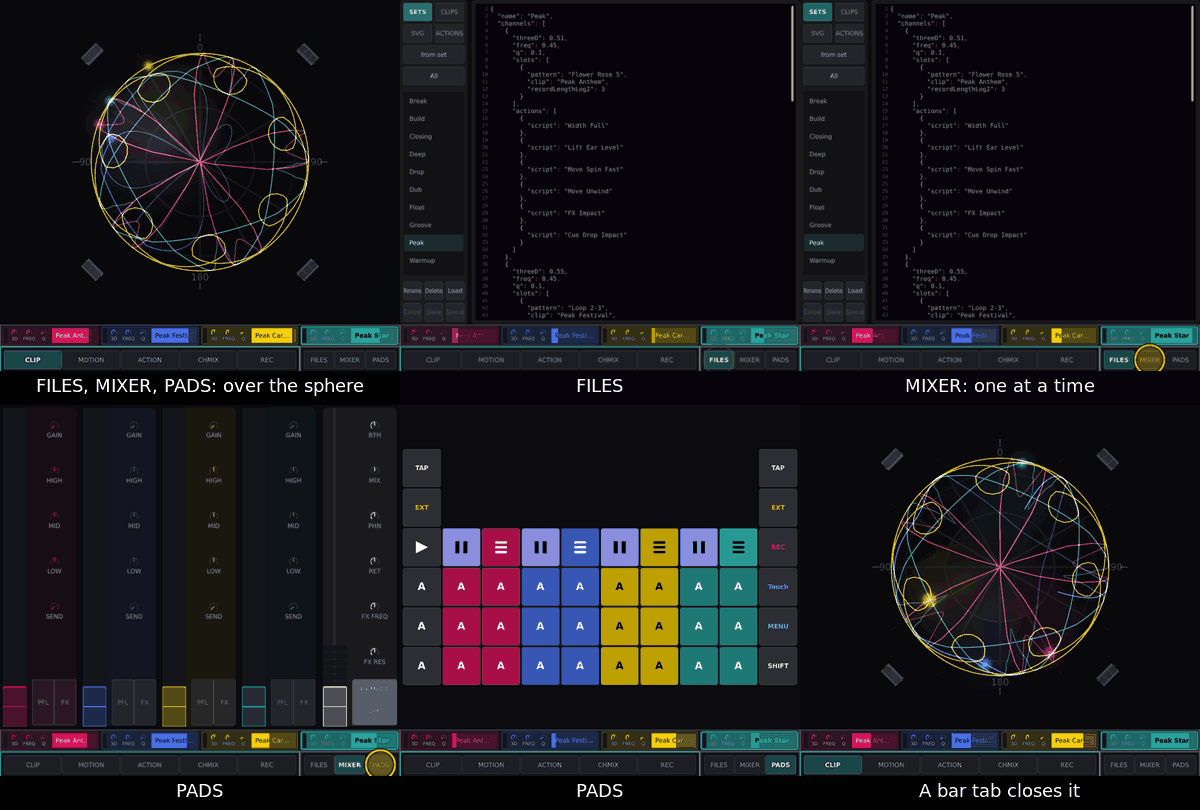
FILES, MIXER and PADS open over the sphere, one at a time; the channel row, bar and global strip stay visible. Closing FILES drops a rename and an armed Delete; editor text stays, unsaved.
The main screen
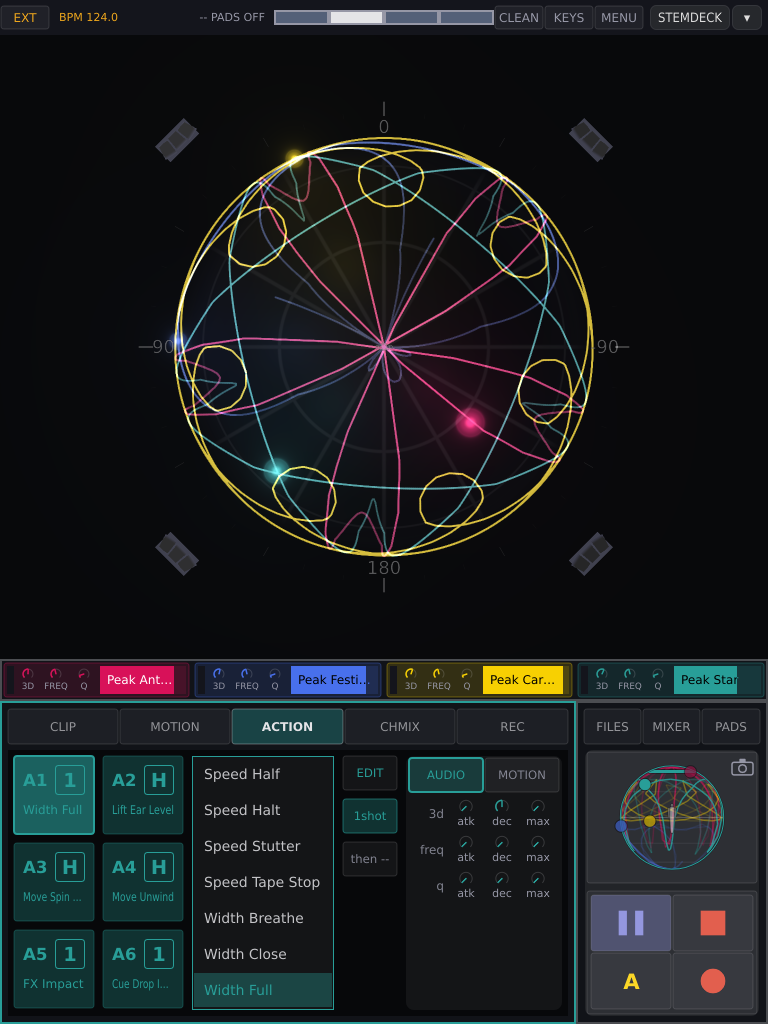
Top to bottom: status bar, sphere, channel row, then the bar (left three quarters) beside the global strip (right quarter).
Status bar
Part |
What it does |
|---|---|
clock key |
tap: INT → EXT → PIO; see Clock modes |
FULL/FPV |
the view: FULL (this page) or FPV; lit in FPV. Kept over a restart |
BREATH |
ORBIT ships stand still on beat 4 of every bar; on at every start. See the breath |
PILOTS |
FPV only, left of CLEAN: OFF → HINT → FLY, how much the pilots play on their own. Kept over a restart. See Pilots and games |
BPM |
the tempo. Read only |
readout |
what was last done, e.g. |
beat display |
four cells, one per beat. Tap it to tap the tempo (INT); in EXT and PIO taps go to the beat analyser |
CLEAN |
clean skin on/off: thin lines, plain blobs, no effects. Grey when none is installed |
KEYS |
on-screen keyboard on/off |
MENU |
|
STEMDECK, ▾ |
the Core’s workspace switch; see A³ Core’s screen |
The sphere
The room from above: the middle is overhead, the rim is ear height. Front is 0° at ear height, the direction Core’s speaker layout calls 0°: the rim’s top point, as long as camera mode has not turned the view. Each channel is a blob where its sound is; it swells and sparks with the channel’s level. A playing clip draws its path as a braid. Below ear height is drawn darker. The corners are the speakers: lightning shows each one’s level, ball lightning the subs. No lightning while music plays: nothing comes back from Core (Troubleshooting).
Gesture |
What it does |
|---|---|
drag a blob |
moves its sound, live. Start on the blob; a drag on empty sphere does nothing. A playing clip takes it back on release. Blobs in the way are pushed aside, sound and all |
several fingers |
one blob each |
during a take |
the first finger writes the take; see REC |
Camera mode (tap the elevation picture in the global strip; it lights) turns the view instead. No finger moves a blob; the view survives a restart.
Gesture in camera mode |
What it does |
|---|---|
drag up / down |
lean towards the horizon / back (from straight above, down does nothing) |
drag sideways |
walk round |
pinch, mouse wheel |
zoom |
double tap |
straight above, unzoomed |
The channel row
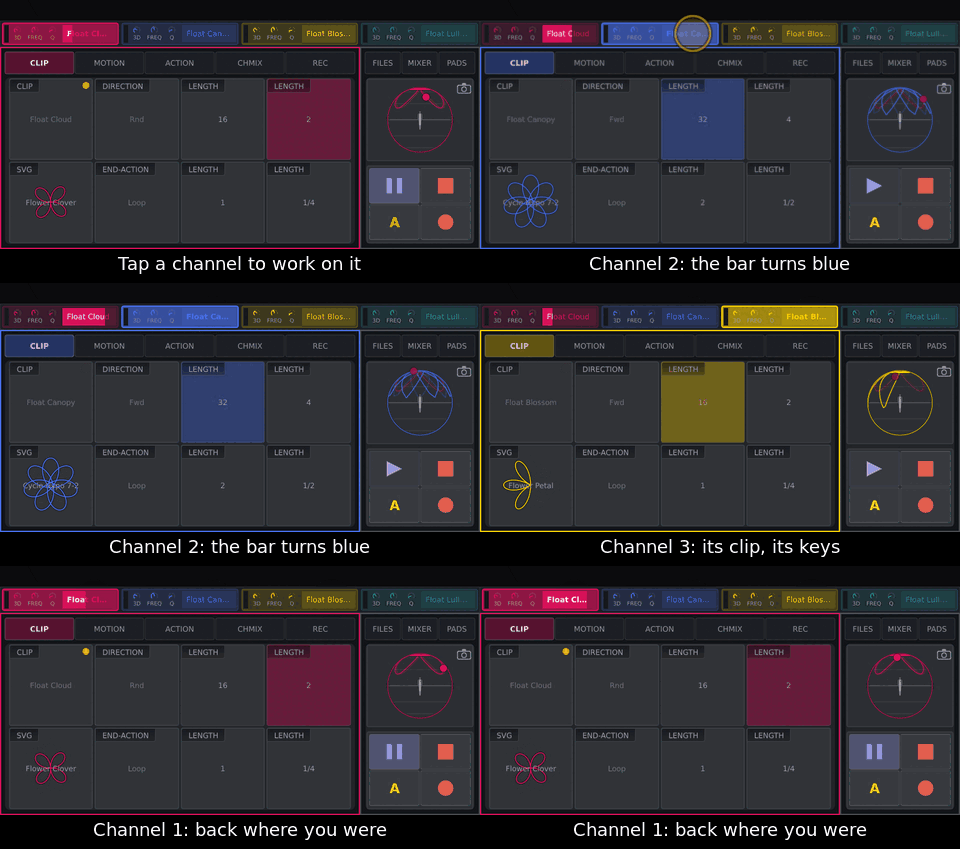
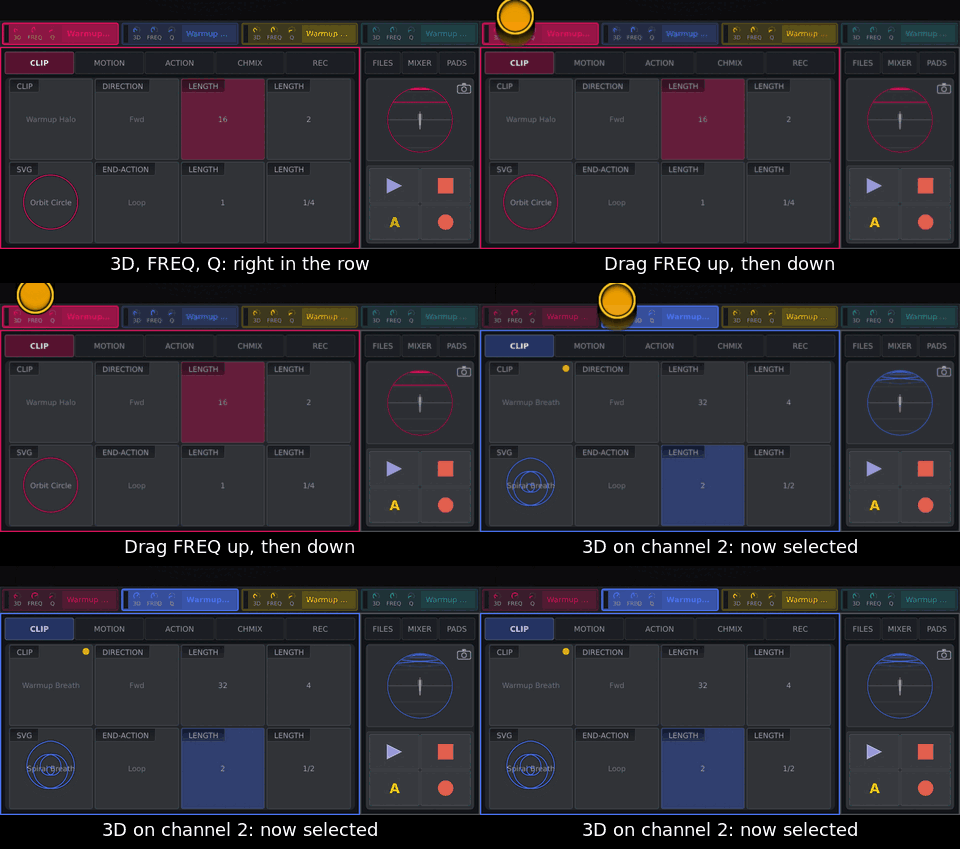
One field per channel, channel 1 left: meter, 3D, FREQ, Q (drag to turn), and a progress bar with the clip’s name. Tap a field to select the channel; touching one of its knobs selects it too. Double tap: 3D and FREQ to twelve o’clock, Q closed — unless the panel is attached, then the pot decides.

The bar
Tabs CLIP MOTION ACTION CHMIX REC, all for the selected channel; a tab also
closes FILES, MIXER or PADS. Double tap a knob to rest it: most to the
middle, sweeps and spin to off, elv so the shape is centred on ear height
(as near as the clips allow; how high that puts the line depends on reach). On a knob playing a lane, the double tap clears
the lane.
The global strip
Part |
What it does |
|---|---|
FILES, MIXER, PADS |
open their window; tap again to close |
elevation picture |
the channels seen from the side. Tap: camera mode |
▶ / ❚❚ |
Play|Pause on the next downbeat; blinks while waiting. ❚❚ keeps the place, ▶ goes on from there and blinks slowly while paused |
■ |
stop now and back to the top; ends a take |
A |
fires the chosen action button while held |
● |
arms a take and opens REC |
After a take, ● becomes SAVE and A becomes DISCARD.
CLIP
Field |
What it does |
|---|---|
CLIP |
the loaded clip. Drag to step through clips. A drift dot: values changed since loading. |
SVG |
the shape. Drag to step through shapes; the values stay |
DIRECTION |
tap: Fwd → Rev → Bnce → Rnd (random start each pass) |
END-ACTION |
tap: Loop → Stop → Paus. Stop returns to the start; Paus stays where the pass ended |
LENGTH × 4 |
beats per pass. Tap to play at it; drag to change the key’s length |
The LENGTH keys scale the clip’s own length: the same key reads 4 on a four-beat shape, 8 on an eight-beat one, 3/8 on a short one. No key lit: the clip plays at a length none holds. The keys are saved in the set.
MOTION
Each field has two knobs: left moves, right sets.
Field |
Left (movement) |
Right (value) |
|---|---|---|
ROTATION |
|
|
REACH |
|
|
SQUEEZE X |
|
|
SQUEEZE Y |
|
|
ELEVATION |
|
|
ELEVATION CLIP |
|
|
TILT |
|
|
ROLL |
|
|
Movement counts in bars, never seconds. A moving knob shows a blue arc. See How a shape sits on the sphere.
ACTION
Six action buttons per channel, A1–A6. An action changes the clip while its accent lasts, then the clip is itself again.
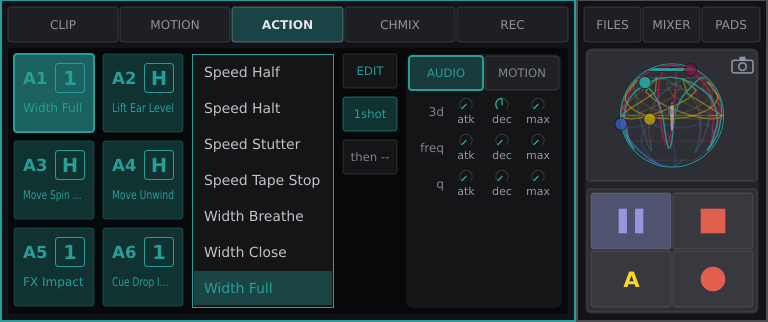
Part |
What it does |
|---|---|
A1–A6 |
number, action name, badge 1 (one-shot) or H (Hold). A tap chooses, it does not fire; pads and A fire |
list |
tap a script to put it on the chosen button; no action clears it |
EDIT |
the script in FILES › ACTIONS |
Hold / 1shot |
lasts while held, or fires and lets go |
then |
the button fired after this one ( |
AUDIO tab |
the accent for 3d, freq, q: |
MOTION tab |
what the action sets: every MOTION knob, plus speed, direction, end. Grey: left to the clip; coloured: set. Two taps hand it back |
Coloured: carries an action; grey: empty (does nothing); thick outline: chosen; white: running. An action pad brings this page up with its button chosen (not with SHIFT, not during a take).
Note
What you set here is saved into the script, for every channel and set. A shipped script is copied first (“Bloom 2”, onto every button that had it), unless Developer Mode is on. See Fire and assign actions.
More: How actions play, Scripting actions.
Encoder |
Turn |
Press |
|---|---|---|
1 |
chooses A1–A6 |
– |
2 |
highlight in the list |
assigns it |
3 |
ring over EDIT, mode, then |
presses it |
4 |
AUDIO ↔ MOTION |
same |
5–8 |
the marked row’s values |
marks the next row |
CHMIX
The selected channel’s strip, as in MIXER.
Control |
What it does |
|---|---|
GAIN |
input gain. Double tap: full |
HIGH, MID, LOW |
EQ. Double tap: flat |
SEND |
to the FX bus (the beat-synced delay). Double tap: none |
CUE |
pre-fader cue. Tap |
FX |
through the shared filter. Tap |
meter |
level and VOL fader: drag the handle, one to one; elsewhere does nothing. Double tap: full |
REC
Steps: Record a take.
Field |
What it does |
|---|---|
CLIP, SVG |
as on CLIP |
RECMODE |
Touch → Latch → Write; see Touch, Latch, Write |
LENGTH × 4 |
the lit key is the take’s length |
GAP-CONNECTOR |
|
On the panel, REC is SHIFT and PLAY all held together; alone it only ends a running take.
FILES
The library on disk. For preparing: mid-set you need only Load.
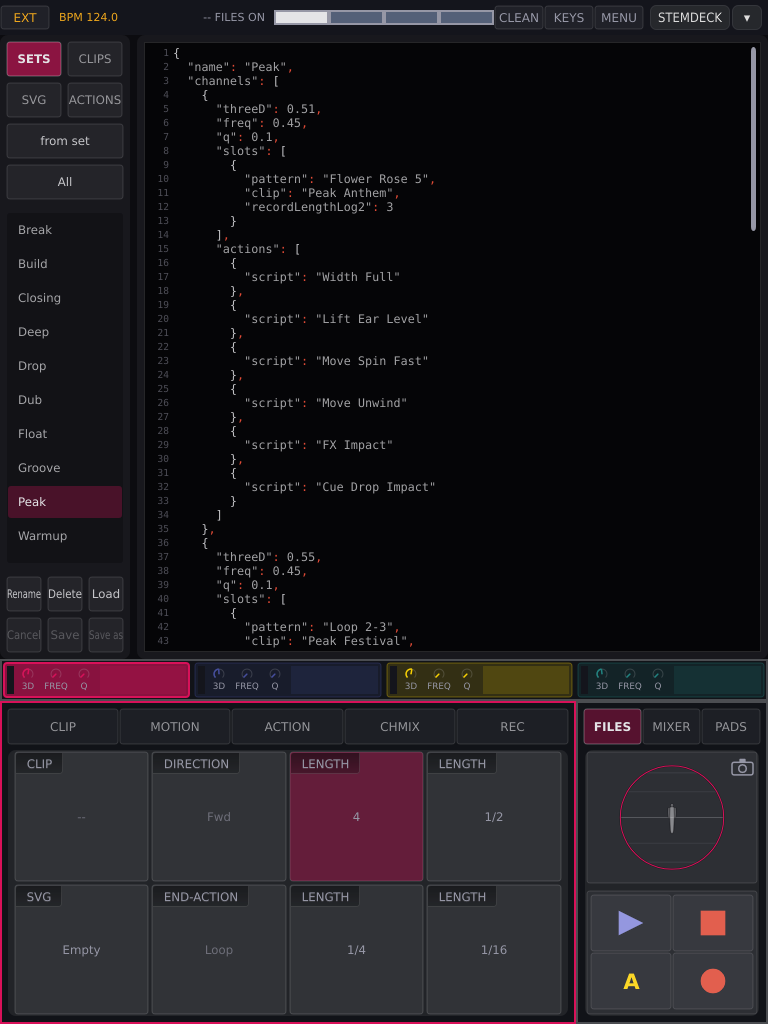
Tabs SETS (clips, actions, 3d/freq/Q and length keys per channel), CLIPS, SVG (shapes), ACTIONS; the list; the keys; the editor on the right. A tap on a row only shows it. The list opens at the selected channel’s file.
Key |
What it does |
|---|---|
Load |
set → all channels; clip or shape → selected channel; action → chosen button |
All / User / System |
filter the list |
Rename |
type; Keep or ENTER keeps, Escape drops. Taken names refused. A renamed clip is renamed in every set |
Delete |
asks Sure?; press again |
from set / from clip |
the device’s current state as text, unsaved |
Cancel |
back to the file’s text |
Save |
overwrites the file; channels using it pick it up at once. A set is only written, not loaded |
Save as |
a copy in your files (“Lift Up 2”; with no file shown, “Action”). Lit only with unsaved text. Not loaded; a copy after EDIT goes on that button |
Unsaved text locks the list:
-- SAVE OR CANCEL.A set or shape that would not load can’t be saved; a script with an error can, and shows the error.
Shipped files can’t be overwritten: use Save as (or Developer Mode, in the menu).
Delete removes only the file; what is loaded keeps playing.
MIXER
The A³ Mixer’s controls for four channels. The desk and this window follow each other, and a restart shows what is really set. The desk has no motor faders; see Mix from the screen.
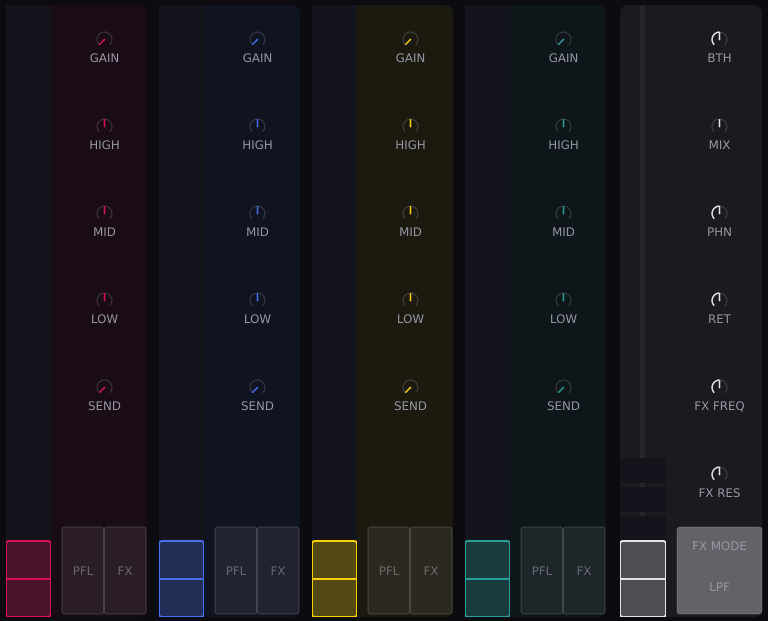
Each strip: meter/VOL handle, GAIN, HIGH MID LOW, SEND (starts shut; double tap shuts it), CUE, FX — as on CHMIX.
Master column |
What it does |
|---|---|
fader |
master: drag the handle. No double tap, so the room can’t go full by accident |
meters |
main sub and tops 1–9 |
BTH |
booth level |
MIX |
phones blend, cue ↔ master. Double tap: middle |
PHN |
phones level |
RET |
FX return. Double tap: none |
FX FREQ, FX RES |
the shared filter. Double tap: FREQ middle, RES none |
FX MODE |
HPF / LPF |
3D, FREQ and Q are in the channel row.
PADS
Per channel, as on the panel:
left |
right |
|
|---|---|---|
row 1 |
Play|Pause |
PAGE |
row 2–4 |
A1, A3, A5 |
A2, A4, A6 |
The window is the panel key for key: 44 keys, ten columns by six rows. Channels in the middle (top two rows empty, where the pots are); the two outer columns are the panel’s end columns, left and right. A screen key is held while touched; SHIFT held on the screen works as on the panel, and the end keys show the shifted layer while it is.
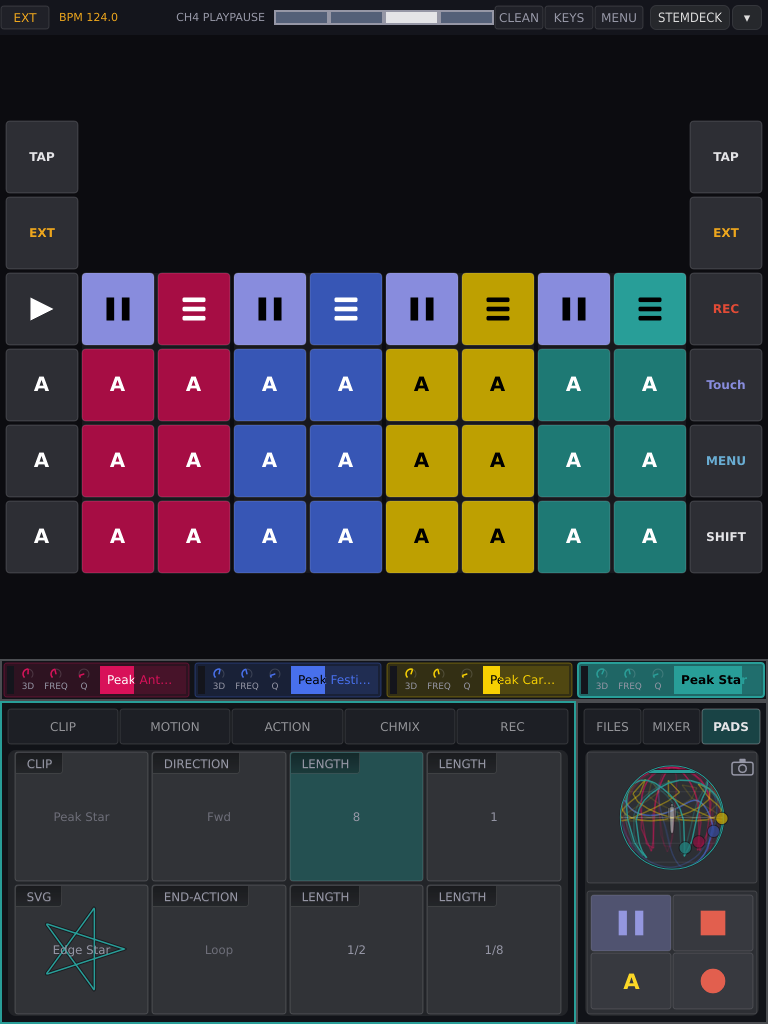
PAGE on another channel selects it; on the selected one it steps the tabs (SHIFT: backwards) and closes FILES, MIXER or PADS. In FPV it switches its channel between CLIP and ORBIT instead.
A pad press selects its channel.
PLAY all is a toggle, see the end columns. There is no separate Stop all.
Lights: Play|Pause lit while playing, blinking while waiting, blinking slowly (two beats on, two off) while paused; action pads dim when assigned, dark when empty, white while running; PAGE lit on the selected channel.
You press |
It happens |
|---|---|
Play|Pause |
next downbeat (a running clip pauses, keeping its place) |
SHIFT + Play|Pause |
now: a running or pausing clip stops, back to the top (the panel has no stop pad); a still one starts from the top |
■ on the screen |
stop now, back to the top |
action pad |
now |
SHIFT + action pad |
now, screen-only preview while held |
a Cue |
loads now, starts on the next downbeat |
SHIFT + a Cue |
now |
Load a set |
all stop now; what the set says was playing starts on the next downbeat (shipped sets: nothing) |
drag on the sphere |
now |
The panel
Per channel: two encoders, a 3d pot and eight pads. Beside them stand the two end columns: TAP, SHIFT, PLAY all and the action keys A1–A6 across all channels. The other functions (clock, REC, REC MODE, MENU) are the SHIFT layer of those keys. Everything else is on the touchscreen.
Control |
What it does |
|---|---|
encoder |
turns the field above it (table below) |
SHIFT + encoder |
upper: freq, lower: Q, on any page |
encoder in FPV |
as with SHIFT: freq / Q of its column; a press does nothing |
pot |
3d: down is plain stereo, up follows the blob |
pads |
see PADS |
end keys |
see the end columns |
Page |
Upper encoders |
Lower encoders |
Press |
|---|---|---|---|
CLIP |
clip, direction, 2 lengths |
shape, end, 2 lengths |
length: play at it |
MOTION |
spin, swell, strX, strY |
sway, clip-top, tswp, rswp |
swap to rot, reach, sqzX, sqzY / elv, clip-bot, tilt, roll |
REC |
clip, rec mode, 2 lengths |
shape, fade, 2 lengths |
fade ↔ bias |
CHMIX |
GAIN, HIGH, MID, LOW |
SEND, CUE, FX, VOL |
CUE, FX: switch |
ACTION |
see ACTION |
The bar marks which of two knobs an encoder drives; the choice is kept. While the keyboard is up, the panel types and no pad fires.
The end columns
The outer column on each side of the panel, six keys tall, is the same on both sides. Both sides of TAP, SHIFT and PLAY all do the same thing; each action key has one place, A1, A3 and A5 on the left and A2, A4 and A6 on the right.
Row |
Left |
Right |
With SHIFT held first |
|---|---|---|---|
1 |
TAP |
TAP |
CLOCK: steps INT → EXT → PIO |
2 |
SHIFT |
SHIFT |
– |
3 |
PLAY all |
PLAY all |
REC, for as long as SHIFT and PLAY all are both held |
4 |
A1 on every channel |
A2 on every channel |
REC MODE: steps Touch → Latch → Write |
5 |
A3 on every channel |
A4 on every channel |
nothing |
6 |
A5 on every channel |
A6 on every channel |
MENU: opens or closes it |
SHIFT first, then the key. That is the shifted function and nothing else. A key already down when you press SHIFT keeps its plain meaning.
SHIFT + TAP never taps the tempo.
REC lasts while you hold SHIFT and PLAY all together; let go of either and it ends. With REC held, a channel’s Play|Pause records onto that channel. Pressed alone, REC only ends a running take.
PLAY all is one key for both jobs. If any clip is playing, it pauses what plays, on the next downbeat. If nothing plays, it starts every clip that stands still. A double tap sends the channels the first tap reached back to the top.
A1–A6 across the columns press that action on all four channels at once. SHIFT with them does nothing.
SHIFT with a channel’s own pads keeps its meanings (see PADS).
Lights. TAP, SHIFT and PLAY all light on both sides, each action key on its own. While SHIFT is held the end columns show the shifted layer instead of the plain one.
On the screen CLOCK and MENU are in the status bar, REC MODE is on the REC page and REC is the transport’s ● key. The PADS page shows both columns too.
While the keyboard is up, these keys type instead.